offset-path CSS property
Baseline
Weitgehend verfügbar
*
Diese Funktion ist gut etabliert und funktioniert auf vielen Geräten und in vielen Browserversionen. Sie ist seit März 2022 browserübergreifend verfügbar.
* Einige Teile dieser Funktion werden möglicherweise unterschiedlich gut unterstützt.
Die CSS-Eigenschaft offset-path legt einen Pfad fest, dem ein Element folgt, und bestimmt die Positionierung des Elements innerhalb des übergeordneten Containers des Pfads oder des SVG-Koordinatensystems. Der Pfad ist eine Linie, eine Kurve oder eine geometrische Form, entlang der das Element positioniert wird oder sich bewegt.
Die Eigenschaft offset-path wird zusammen mit den Eigenschaften offset-distance, offset-rotate und offset-anchor verwendet, um die Position und Ausrichtung des Elements entlang eines Pfads zu steuern.
Probieren Sie es aus
offset-path: path("M-70,-40 C-70,70 70,70 70,-40");
offset-path: path("M0,0 L60,70 L-60,30z");
<section class="default-example" id="default-example">
  <div class="transition-all" id="example-element"></div>
  <button id="playback" type="button">Play</button>
</section>
#example-element {
  width: 24px;
  height: 24px;
  background: #2bc4a2;
  animation: distance 8000ms infinite linear;
  animation-play-state: paused;
  clip-path: polygon(0% 0%, 70% 0%, 100% 50%, 70% 100%, 0% 100%, 30% 50%);
}

#example-element.running {
  animation-play-state: running;
}

#playback {
  position: absolute;
  top: 0;
  left: 0;
  font-size: 1em;
}

@keyframes distance {
  0% {
    offset-distance: 0%;
  }
  100% {
    offset-distance: 100%;
  }
}

#default-example {
  position: relative;
}
const example = document.getElementById("example-element");
const button = document.getElementById("playback");

button.addEventListener("click", () => {
  if (example.classList.contains("running")) {
    example.classList.remove("running");
    button.textContent = "Play";
  } else {
    example.classList.add("running");
    button.textContent = "Pause";
  }
});
Syntax
/* Default */
offset-path: none;

/* Line segment */
offset-path: ray(45deg closest-side contain);
offset-path: ray(contain 150deg at center center);
offset-path: ray(45deg);

/* URL */
offset-path: url("#my-circle");

/* Basic shape */
offset-path: circle(50% at 25% 25%);
offset-path: ellipse(50% 50% at 25% 25%);
offset-path: inset(50% 50% 50% 50%);
offset-path: polygon(30% 0%, 70% 0%, 100% 50%, 30% 100%, 0% 70%, 0% 30%);
offset-path: path("M 0,200 Q 200,200 260,80 Q 290,20 400,0 Q 300,100 400,200");
offset-path: rect(5px 5px 160px 145px round 20%);
offset-path: xywh(0 5px 100% 75% round 15% 0);

/* Coordinate box */
offset-path: content-box;
offset-path: padding-box;
offset-path: border-box;
offset-path: fill-box;
offset-path: stroke-box;
offset-path: view-box;

/* Global values */
offset-path: inherit;
offset-path: initial;
offset-path: revert;
offset-path: revert-layer;
offset-path: unset;
Werte
Die Eigenschaft offset-path akzeptiert als Wert einen <offset-path>-Wert, einen <coord-box>-Wert, beides zusammen oder das Schlüsselwort none. Der <offset-path>-Wert ist eine ray()-Funktion, ein <url>-Wert oder ein <basic-shape>-Wert.
none-
Gibt an, dass das Element keinem Offset-Pfad folgt. Der Wert
noneentspricht einem Element ohne Offset-Transformation. Die Bewegung des Elements wird in diesem Fall durch seine gewöhnlichen Positionierungseigenschaften wietopundleftbestimmt, statt durch einen Offset-Pfad. Dies ist der Standardwert. <offset-path>-
Eine
ray()-Funktion, ein<url>-Wert oder ein<basic-shape>-Wert, der den geometrischen Offset-Pfad festlegt. Wird dieser Wert weggelassen, lautet die Pfadform für den<coord-box>-Wertinset(0 round X), wobeiXder Wert vonborder-radiusdes Elements ist, das den umschließenden Block festlegt.ray()-
Definiert eine Linie, die an einer festgelegten Position beginnt, eine festgelegte Länge hat und sich im angegebenen Winkel erstreckt. Die Funktion
ray()akzeptiert bis zu vier Parameter: einen<angle>, einen optionalen Größenwert, das optionale Schlüsselwortcontainund ein optionalesat <position>. <url>-
Gibt die ID eines SVG-Formelements an. Der Pfad entspricht der Form des SVG-Elements
<circle>,<ellipse>,<line>,<path>,<polygon>,<polyline>oder<rect>, auf das in der Funktionurl()über seineidverwiesen wird. Wenn die URL nicht auf ein Formelement verweist oder aus einem anderen Grund ungültig ist, wird für den Offset-Pfad der Wertpath("M0,0")aufgelöst (ein gültiger<basic-shape>-Wert). <basic-shape>-
Legt den Offset-Pfad als den entsprechenden Pfad einer CSS-Funktion für Grundformen fest, beispielsweise
circle(),ellipse(),inset(),path(),polygon(),rect()oderxywh(). Wenn<basic_shape>beispielsweise eineellipse()-Funktion ist, entspricht der Pfad dem Umriss der Ellipse. Er beginnt am äußersten rechten Punkt der Ellipse und verläuft im Uhrzeigersinn einmal um sie herum. Beiellipse()undcircle(), die den Parameterat <position>akzeptieren, ist die Position standardmäßigcenter, wenn<position>weggelassen wird – es sei denn, für das Element istoffset-positionfestgelegt. In diesem Fall wird der Wert vonoffset-positionfür den Parameterat <position>verwendet. Komplexere Formen lassen sich mit der Funktionshape()definieren.
<coord-box>-
Gibt die Größeninformationen der Referenzbox an, die den Pfad enthält. Die Referenzbox wird aus dem Element abgeleitet, das den umschließenden Block für dieses Element festlegt. Dieser Parameter ist optional. Wenn er nicht angegeben wird, ist der Standardwert in CSS-Kontexten
border-box. In SVG-Kontexten wird der Wert alsview-boxbehandelt. Wennray()oder<basic-shape>den Offset-Pfad definiert, stellt der<coord-box>-Wert die Referenzbox für den Strahl beziehungsweise die<basic-shape>bereit. Wenn<url>den Offset-Pfad definiert, stellt der<coord-box>-Wert den Viewport und das Benutzerkoordinatensystem für das Formelement bereit. Deren Ursprung (0 0) liegt in der oberen linken Ecke, und ihre Größe beträgt1px.
Beschreibung
Die Eigenschaft offset-path definiert einen Pfad, dem ein animiertes Element folgen kann. Ein Offset-Pfad ist entweder ein angegebener Pfad mit einem oder mehreren Teilpfaden oder die Geometrie einer Grundform ohne Formatierung. Die genaue Position des Elements auf dem Offset-Pfad wird durch die Eigenschaft offset-distance bestimmt. Jede Form und jeder Pfad muss eine Anfangsposition für den berechneten Wert 0 von offset-distance sowie eine Anfangsrichtung definieren, die die Drehung des Objekts an der Anfangsposition festlegt.
In frühen Versionen der Spezifikation hieß diese Eigenschaft motion-path. Sie wurde in offset-path umbenannt, weil die Eigenschaft statische Positionen beschreibt und keine Bewegung.
Formale Definition
| Anfangswert | none |
|---|---|
| Anwendbar auf | transformierbare Elemente |
| Vererbt | Nein |
| Berechneter Wert | wie angegeben |
| Animationstyp | by computed value type |
| Erstellt Stapelkontext | Ja |
Formale Syntax
offset-path =
  none                          |
  <offset-path> || <coord-box>

<offset-path> =
  <ray()>        |
  <url>          |
  <basic-shape>

<coord-box> =
  <paint-box>  |
  view-box

<ray()> =
  ray( <angle>          &&
  <ray-size>?           &&
  contain?              &&
  [ at <position> ]? )

<basic-shape> =
  <basic-shape-rect>  |
  <circle()>          |
  <ellipse()>         |
  <polygon()>         |
  <path()>            |
  <shape()>

<paint-box> =
  <visual-box>  |
  fill-box      |
  stroke-box

<ray-size> =
  <radial-extent>  |
  sides

<position> =
  <position-one>   |
  <position-two>   |
  <position-four>

<basic-shape-rect> =
  <inset()>  |
  <rect()>   |
  <xywh()>

<circle()> =
  circle( <radial-size>? [ at <position> ]? )

<ellipse()> =
  ellipse( <radial-size>? [ at <position> ]? )

<polygon()> =
  polygon( <'fill-rule'>? [ round <length> ]? , [ <length-percentage> <length-percentage> ]# )

<path()> =
  path( <'fill-rule'>? , <string> )

<shape()> =
  shape( <'fill-rule'>? from <position> , <shape-command># )

<visual-box> =
  content-box  |
  padding-box  |
  border-box

<radial-extent> =
  closest-corner   |
  closest-side     |
  farthest-corner  |
  farthest-side

<position-one> =
  left                 |
  center               |
  right                |
  top                  |
  bottom               |
  x-start              |
  x-end                |
  y-start              |
  y-end                |
  block-start          |
  block-end            |
  inline-start         |
  inline-end           |
  <length-percentage>

<position-two> =
  [ left | center | right | x-start | x-end ] && [ top | center | bottom | y-start | y-end ]  |
  [ left | center | right | x-start | x-end | <length-percentage> ] [ top | center | bottom | y-start | y-end | <length-percentage> ]  |
  [ block-start | center | block-end ] && [ inline-start | center | inline-end ]  |
  [ start | center | end ]{2}

<position-four> =
  [ [ left | right | x-start | x-end ] <length-percentage> ] && [ [ top | bottom | y-start | y-end ] <length-percentage> ]  |
  [ [ block-start | block-end ] <length-percentage> ] && [ [ inline-start | inline-end ] <length-percentage> ]  |
  [ [ start | end ] <length-percentage> ]{2}

<inset()> =
  inset( <length-percentage>{1,4} [ round <'border-radius'> ]? )

<rect()> =
  rect( <top> , <right> , <bottom> , <left> )

<xywh()> =
  xywh( <length-percentage>{2} <length-percentage [0,∞]>{2} [ round <'border-radius'> ]? )

<radial-size> =
  <radial-extent>               |
  <length [0,∞]>                |
  <length-percentage [0,∞]>{2}

<fill-rule> =
  nonzero  |
  evenodd

<length-percentage> =
  <length>      |
  <percentage>

<shape-command> =
  <move-command>             |
  <line-command>             |
  close                      |
  <horizontal-line-command>  |
  <vertical-line-command>    |
  <curve-command>            |
  <smooth-command>           |
  <arc-command>

<border-radius> =
  <length-percentage [0,∞]>{1,4} [ / <length-percentage [0,∞]>{1,4} ]?

<move-command> =
  move <command-end-point>

<line-command> =
  line <command-end-point>

<horizontal-line-command> =
  hline [ to [ <length-percentage> | left | center | right | x-start | x-end ] | by <length-percentage> ]

<vertical-line-command> =
  vline [ to [ <length-percentage> | top | center | bottom | y-start | y-end ] | by <length-percentage> ]

<curve-command> =
  curve [ [ to <position> with <control-point> [ / <control-point> ]? ] | [ by <coordinate-pair> with <relative-control-point> [ / <relative-control-point> ]? ] ]

<smooth-command> =
  smooth [ [ to <position> [ with <control-point> ]? ] | [ by <coordinate-pair> [ with <relative-control-point> ]? ] ]

<arc-command> =
  arc <command-end-point> [ [ of <length-percentage>{1,2} ] && <arc-sweep>? && <arc-size>? && [ rotate <angle> ]? ]

<command-end-point> =
  to <position>         |
  by <coordinate-pair>

<control-point> =
  <position>                |
  <relative-control-point>

<coordinate-pair> =
  <length-percentage>{2}

<relative-control-point> =
  <coordinate-pair> [ from [ start | end | origin ] ]?

<arc-sweep> =
  cw   |
  ccw

<arc-size> =
  large  |
  small
Beispiele
Einen Offset-Pfad mithilfe von Box-Kanten erstellen
Dieses Beispiel zeigt die Verwendung verschiedener <coord-box>-Werte in der Eigenschaft offset-path.
.box {
  width: 40px;
  height: 20px;
  animation: move 8000ms infinite ease-in-out;
}

.blueBox {
  background-color: blue;
  offset-path: border-box;
  offset-distance: 5%;
}

.greenBox {
  background-color: green;
  offset-path: padding-box;
  offset-distance: 8%;
}

.redBox {
  background-color: red;
  offset-path: content-box;
  offset-distance: 12%;
}

@keyframes move {
  0%,
  20% {
    offset-distance: 0%;
  }
  80%,
  100% {
    offset-distance: 100%;
  }
}
In diesem Beispiel wurden margin, border und padding bewusst große Werte zugewiesen, um die Platzierung der blauen, grünen und roten Rechtecke an den Kanten ihrer jeweiligen <coord-box> zu veranschaulichen: border-box, padding-box und content-box.
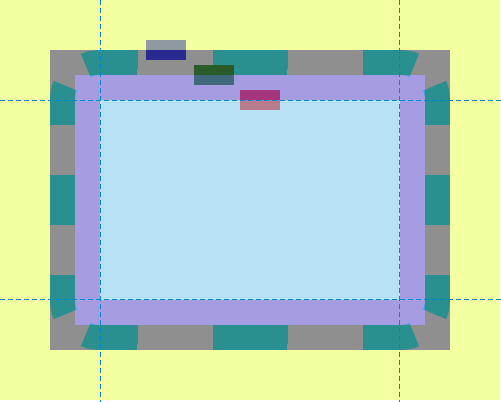
Ergebnis
Einen Offset-Pfad mit path() erstellen
In diesem Beispiel erzeugt das Element <svg> ein Haus mit einem Schornstein und definiert außerdem zwei Scherenhälften. Haus und Schornstein bestehen aus Rechtecken und Polygonen; die Scherenhälften werden durch zwei verschiedene path-Elemente dargestellt. Im CSS-Code wird die Eigenschaft offset-path verwendet, um einen Pfad festzulegen, dem die beiden Scherenhälften folgen. Dieser in CSS definierte Pfad ist mit dem Pfad identisch, den das <path>-Element im SVG darstellt: dem Umriss des Hauses einschließlich des Schornsteins.
<svg
  xmlns="http://www.w3.org/2000/svg"
  width="700"
  height="450"
  viewBox="350 0 1400 900">
  <title>House and Scissors</title>
  <rect x="595" y="423" width="610" height="377" fill="blue" />
  <polygon points="506,423 900,190 1294,423" fill="yellow" />
  <polygon points="993,245 993,190 1086,190 1086,300" fill="red" />
  <path
    id="house"
    d="M900,190 L993,245 V201 A11,11 0 0,1 1004,190 H1075 A11,11 0 0,1 1086,201 V300 L1294,423 H1216 A11,11 0 0,0 1205,434 V789 A11,11 0 0,1 1194,800 H606 A11,11 0 0,1 595,789 V434 A11,11 0 0,0 584,423 H506 L900,190"
    fill="none"
    stroke="black"
    stroke-width="13"
    stroke-linejoin="round"
    stroke-linecap="round" />
  <path
    id="first-scissor-half"
    class="scissor-half"
    d="M30,0 H-10 A10,10 0 0,0 -20,10 A20,20 0 1,1 -40,-10 H20 A10,10 0 0,1 30,0 M-40,20 A10,10 1 0,0 -40,0 A10,10 1 0,0 -40,20 M0,0" />
  <path
    id="second-scissor-half"
    class="scissor-half"
    d="M30,0 H-10 A10,10 0 0,1 -20,-10 A20,20 0 1,0 -40,10 H20 A10,10 0 0,0 30,0 M-40,-20 A10,10 1 0,0 -40,0 A10,10 1 0,0 -40,-20 M0,0" />
</svg>
.scissor-half {
  offset-path: path(
    "M900,190 L993,245 V201 A11,11 0 0,1 1004,190 H1075 A11,11 0 0,1 1086,201 V300 L1294,423 H1216 A11,11 0 0,0 1205,434 V789 A11,11 0 0,1 1194,800 H606 A11,11 0 0,1 595,789 V434 A11,11 0 0,0 584,423 H506 L900,190"
  );
  transform: translate(0px, 0px);
  fill: green;
  stroke: black;
  stroke-width: 5px;
  stroke-linejoin: round;
  stroke-linecap: round;
  fill-rule: evenodd;
  offset-anchor: 0 0;
}

#first-scissor-half {
  animation:
    move 12s linear infinite,
    rotate-left 1s infinite;
}
#second-scissor-half {
  animation:
    move 12s linear infinite,
    rotate-right 1s infinite;
}

@keyframes move {
  from {
    offset-distance: 0%;
  }
  to {
    offset-distance: 100%;
  }
}

@keyframes rotate-left {
  0% {
    offset-rotate: auto 0deg;
  }
  50% {
    offset-rotate: auto -45deg;
  }
  100% {
    offset-rotate: auto 0deg;
  }
}

@keyframes rotate-right {
  0% {
    offset-rotate: auto 0deg;
  }
  50% {
    offset-rotate: auto 45deg;
  }
  100% {
    offset-rotate: auto 0deg;
  }
}
Ergebnis
Ohne die Eigenschaft offset-path würden die beiden Scherenhälften standardmäßig in der oberen linken Ecke der Zeichenfläche positioniert. Durch die Verwendung von offset-path werden sie stattdessen am Anfangspunkt des SVG-Pfads ausgerichtet und können sich entlang dieses Pfads bewegen.
Einen Offset-Pfad mit url() erstellen
Dieses Beispiel zeigt, wie Sie auf eine SVG-Form verweisen, um die Form des Pfads festzulegen, dem ein Element folgen kann. Der grüne Kreis (definiert durch .target) folgt dem Pfad eines Rechtecks. Dazu wird die ID der SVG-Form (svgRect) mithilfe von url() an die Eigenschaft offset-path übergeben.
Das SVG-Rechteck, das die Pfadform definiert, ist hier nur zu sehen, um zu veranschaulichen, dass der grüne Kreis tatsächlich dem durch dieses Rechteck definierten Pfad folgt.
<div class="outer">
  <div class="target"></div>
</div>
<svg width="400" height="200" xmlns="http://www.w3.org/2000/svg">
  <rect id="svgRect" x="50" y="50" width="200" height="100" />
</svg>
.target {
  width: 50px;
  height: 50px;
  border-radius: 50%;
  background-color: green;
  offset-path: url("#svgRect");
  offset-anchor: auto;
  animation: move 5s linear infinite;
}

#svgRect {
  fill: antiquewhite;
  stroke: black;
  stroke-width: 2;
}

@keyframes move {
  0% {
    offset-distance: 0%;
  }
  100% {
    offset-distance: 100%;
  }
}
Verschiedene Formen
Dieses Beispiel verwendet verschiedene <basic-shape>-Werte: circle(), ellipse(), inset() und polygon().
<div class="container">
  <div class="mover mover-path">path()</div>
  <div class="mover mover-circle">circle()</div>
  <div class="mover mover-ellipse">ellipse()</div>
  <div class="mover mover-inset">inset()</div>
  <div class="mover mover-polygon">polygon()</div>
</div>
.container {
  border: 1px solid black;
  width: 80vw;
  height: 80vh;
  position: relative;
  left: 10vw;
  top: 10vh;
}

.mover {
  width: 100px;
  height: 80px;
  border-radius: 50%;
  line-height: 80px;
  text-indent: 10px;
  background: url("data:image/svg+xml,%3Csvg xmlns='http://www.w3.org/2000/svg' id='e644da42-a34e-4ceb-a89a-89a4eb6dcc51' data-name='Layer 1' viewBox='0 0 71.08 54.62'%3E%3Ctitle%3Epointer-hand%3C/title%3E%3Cpath d='M43.56,49.35a5.24,5.24,0,0,0-1.27-3.43,5.26,5.26,0,0,0,1.86-9,5.26,5.26,0,0,0-.5-9.53L66.12,27c2.28-.07,5-1.57,5-4.58a5.06,5.06,0,0,0-4.58-4.83L34.08,17c3.48-2.89,6.26-6.55,6.73-11.08C41.45-.14,36.07-1.15,35,1.09,32,7.11,23,12.75,17.42,15.52,8.64,19.08,0,19.77,0,34.56,0,42.7,2.7,47.94,9.42,51c5.51,2.52,13.71,3.59,25.36,3.59H38.3A5.27,5.27,0,0,0,43.56,49.35Z'/%3E%3C/svg%3E")
    no-repeat;
  background-size: cover;
  color: white;
  animation: move 10s linear infinite;
  font-family: monospace;
  position: absolute;
  left: 50%;
  transform: translateX(-50%);
  transform-origin: center center;
}
.mover-path {
  top: 50px;
  motion-path: path(
    "M18.45,58.46s52.87-70.07,101.25-.75,101.75-6.23,101.75-6.23S246.38,5.59,165.33,9.08s-15,71.57-94.51,74.56S18.45,58.46,18.45,58.46Z"
  );
  offset-path: path(
    "M18.45,58.46s52.87-70.07,101.25-.75,101.75-6.23,101.75-6.23S246.38,5.59,165.33,9.08s-15,71.57-94.51,74.56S18.45,58.46,18.45,58.46Z"
  );
}
.mover-circle {
  top: 150px;
  offset-path: circle(100px at 50px 50px);
  motion-path: circle(100px at 50px 50px);
}
.mover-ellipse {
  top: 250px;
  offset-path: ellipse(25% 40% at 50% 50%);
  motion-path: ellipse(25% 40% at 50% 50%);
}
.mover-inset {
  top: 350px;
  offset-path: inset(5% 20% 15% 10%);
  motion-path: inset(5% 20% 15% 10%);
}
.mover-polygon {
  top: 450px;
  offset-path: polygon(
    30% 0%,
    70% 0%,
    100% 30%,
    100% 70%,
    70% 100%,
    30% 100%,
    0% 70%,
    0% 30%
  );
  motion-path: polygon(
    30% 0%,
    70% 0%,
    100% 30%,
    100% 70%,
    70% 100%,
    30% 100%,
    0% 70%,
    0% 30%
  );
}

@keyframes move {
  100% {
    motion-offset: 100%;
    offset-distance: 100%;
  }
}
Spezifikationen
| Spezifikation |
|---|
| Motion Path Module Level 1 # offset-path-property |
Browser-Kompatibilität
Siehe auch
offsetoffset-distanceoffset-rotate- Tutorial zu SVG-Pfaden
path()